
How to install a VPN and Login to company Email
To install a VPN and log in to your company email, start by downloading the approved VPN from this video guide. Follow the installation prompts. Next, open your email on Ionos, enter your company email address and password, and log in. You should now have secure access to your company email and internal resources through the VPN connection.
How to Add a Signature to Your Company Email
Adding a professional email signature helps to properly represent Proudtobeme. Follow the steps below to set up your company email signature.
Ubokudom Sunday Ubokudom
Website Manager & IT Personnel
ProudtobemeEmail: it@proudtobeme.org

If you find it difficult to download image click here for drive link for image
Add Social Media Icons to Your Email Signature
A quick, step-by-step guide to placing your Instagram, Facebook, and TikTok icons into your webmail signature — plus a ready-to-paste code snippet at the bottom of this page.
Step-by-step guide
1
Open your webmail settings
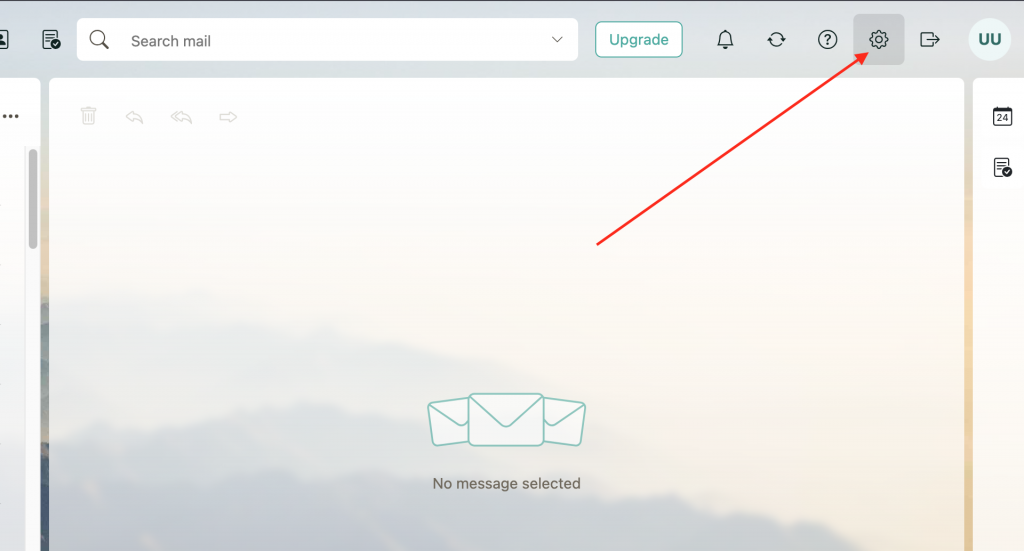
In your inbox, click the gear (Settings) icon in the top-right corner of the screen.
2
Go to All settings…
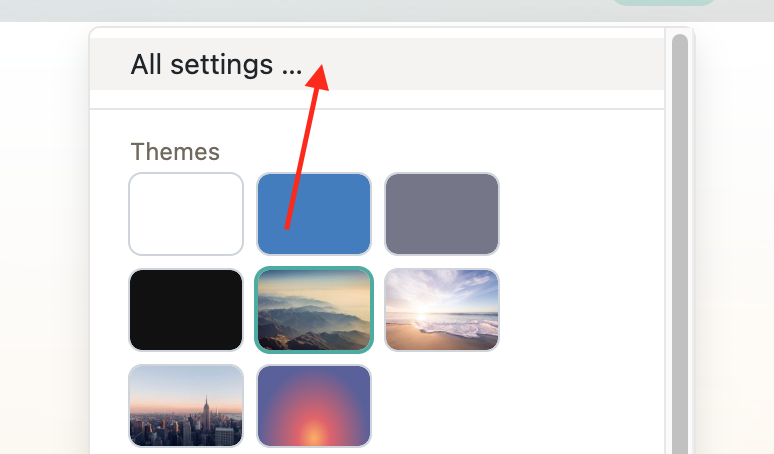
A quick-settings panel drops down. Click “All settings…” at the bottom of it to open the full settings page.
3
Navigate to Signatures
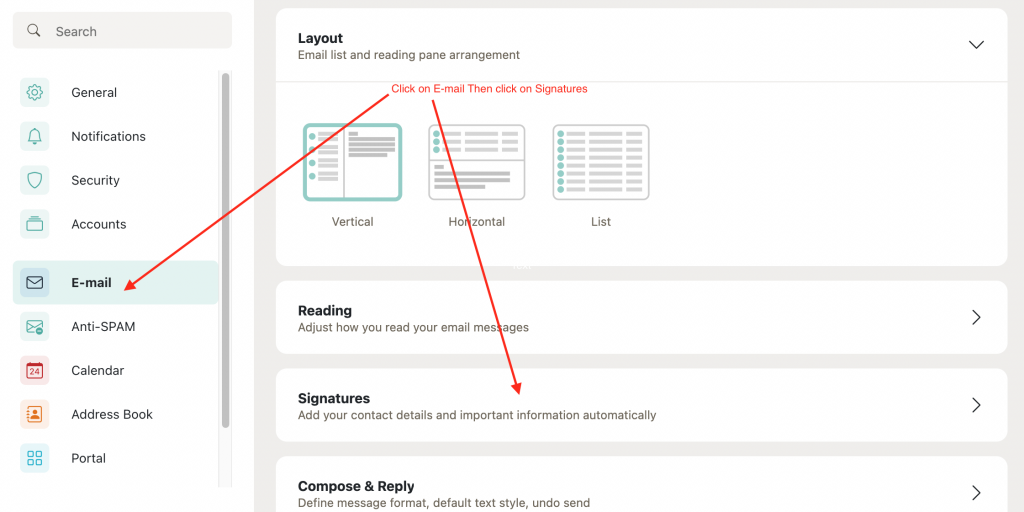
In the settings sidebar on the left, click E-Mail, then click Signatures underneath it.
4
Edit your signature
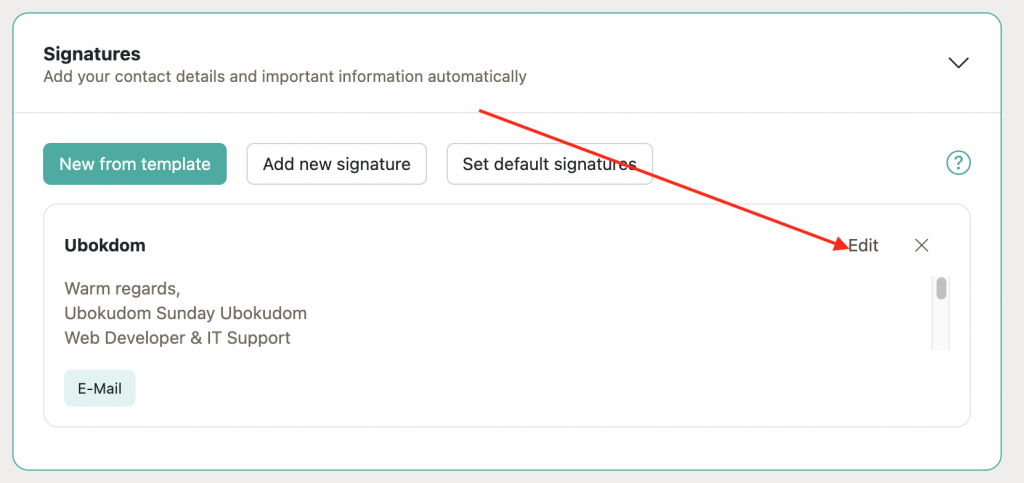
In the list of signatures, find the one you use and click Edit next to it.
5
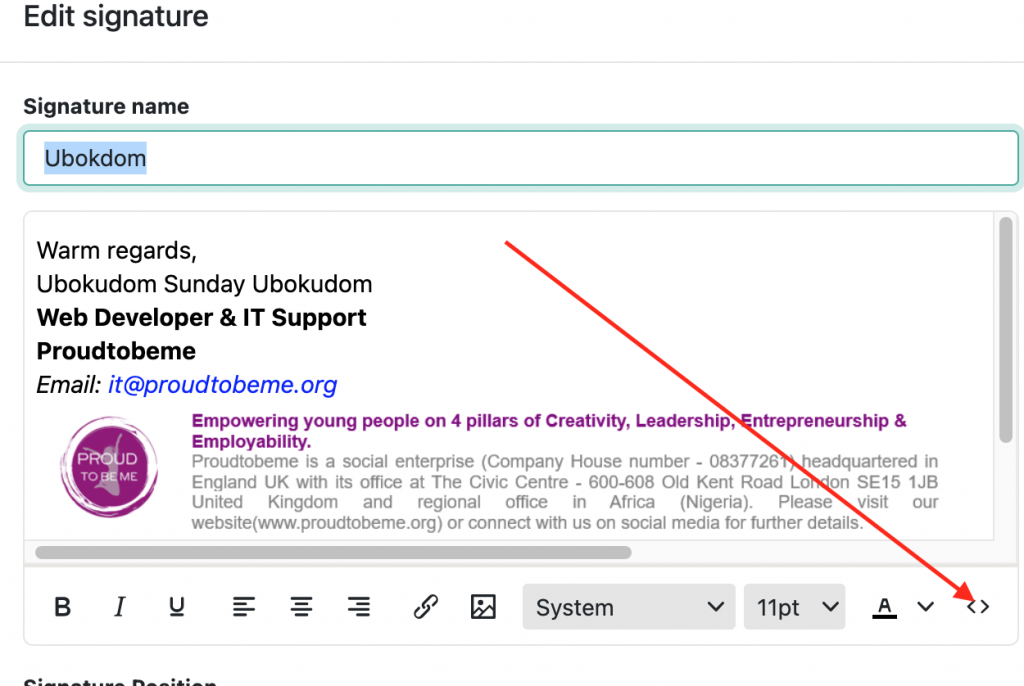
Open the source code view
In the signature editor toolbar, click the source code icon, shown as angle brackets ‹›, to switch to raw HTML mode.
6
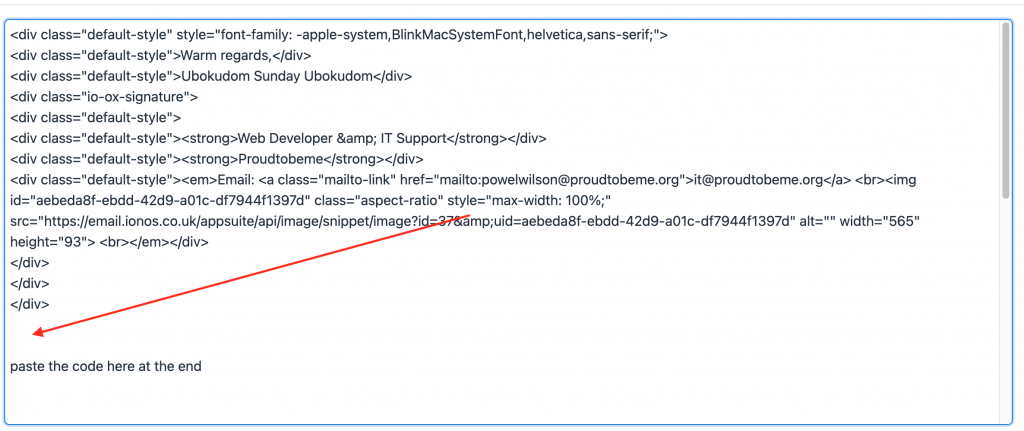
Paste the code
Copy the signature code from the box below and paste it in at the end of your existing signature source code.
7
Save your signature
Click Save. Your signature now includes clickable Instagram, Facebook, and TikTok icons.
Copy your signature code
This code already includes your Instagram, Facebook, and TikTok icons and links. Click Copy code, then paste it at the end of your existing signature source code in Step 6 above.
SIGNATURE HTML
<table role="presentation" style="font-family: Arial, Helvetica, sans-serif; height: 15px; width: 97.1681%;" border="0" cellspacing="0" cellpadding="0">
<tbody>
<tr>
<td style="width: 5.07926%;" valign="middle">
<a style="text-decoration: none;" href="https://www.instagram.com/_proud2bemeinternational/">
<img style="vertical-align: middle; border: 0; display: block;" src="https://proudtobeme.org/wp-content/uploads/2026/08/icon-instagram_1.png" alt="Instagram" width="20" height="20">
</a>
</td>
<td style="padding-left: 6px; padding-right: 10px; width: 27.8673%;" valign="middle">
<a style="color: #1155cc; text-decoration: underline; font-size: 14px; font-family: Arial, Helvetica, sans-serif;" href="https://www.instagram.com/_proud2bemeinternational/">
instagram.com/_proud2bemeinternational
</a>
</td>
<td style="color: rgb(153, 153, 153); padding-right: 10px; font-size: 14px; width: 3.15738%;" valign="middle">|</td>
<td style="width: 5.07926%;" valign="middle">
<a style="text-decoration: none;" href="https://web.facebook.com/people/Proudtobeme-International/61560374923332/">
<img style="vertical-align: middle; border: 0; display: block;" src="https://proudtobeme.org/wp-content/uploads/2026/08/icon-facebook_2.png" alt="Facebook" width="20" height="20">
</a>
</td>
<td style="padding-left: 6px; padding-right: 10px; width: 26.2199%;" valign="middle">
<a style="color: #1155cc; text-decoration: underline; font-size: 14px; font-family: Arial, Helvetica, sans-serif;" href="https://web.facebook.com/people/Proudtobeme-International/61560374923332/">
facebook.com/people/Proudtobeme-International
</a>
</td>
<td style="color: rgb(153, 153, 153); padding-right: 10px; font-size: 14px; width: 3.15738%;" valign="middle">|</td>
<td style="width: 5.07926%;" valign="middle">
<a style="text-decoration: none;" href="https://www.tiktok.com/@proudtobemeinternational">
<img style="vertical-align: middle; border: 0; display: block;" src="https://proudtobeme.org/wp-content/uploads/2026/08/icon-tiktok_2.png" alt="TikTok" width="20" height="20">
</a>
</td>
<td style="padding-left: 6px; width: 24.5726%;" valign="middle">
<a style="color: #1155cc; text-decoration: underline; font-size: 14px; font-family: Arial, Helvetica, sans-serif;" href="https://www.tiktok.com/@proudtobemeinternational">
tiktok.com/@proudtobemeinternational
</a>
</td>
</tr>
</tbody>
</table>


